Showing posts with label Free Mac DVD Ripper. Show all posts

Tuesday, July 1, 2014

How to Freely Rip DVD to MP4 on Mac


It is true that MP4 referring to MPEG-4 Part 14 is a file format (also called container) specified as a part of the ISO/IEC MPEG-4 international standard. Commonly, MP4 is used to store digital audio and digital video streams, especially those defined by MPEG, but it also can be used to store other data such as subtitles and still images. Because it is a functional video format, gradually, most of portable devices and online websites support this format.

For those DVD collectors, if they want to share their valuable collections to others by uploading DVD contents to websites or playback DVDs on the mobile devices, they must be so eager to rip DVD to MP4 freely as they cannot play DVD files in MP4 directly. A long way to find the suitable and cheap Mac DVD ripper begins.

MacX DVD Ripper Mac Free Edition is a totally freeware designed for Mac users to rip and backup DVDs. This all-in-one DVD ripper for Mac can freely rip any encrypted DVDs including CSS encryption, Sony ARccOS, region protection, UOPs, APS, Disney movies copy protection to MP4, MOV, FLV, MPEG, iTunes videos, thus you can enjoy DVD movies by your iPhone, iPod, iPad, Mac computer, QuickTime, iTunes, even upload them to share with your friends. The fast ripping speed and excellent image and sound quality will satisfy all of your ripping needs.


Guide: How to Rip DVD Free on Mac OS with Free DVD ripper for Mac
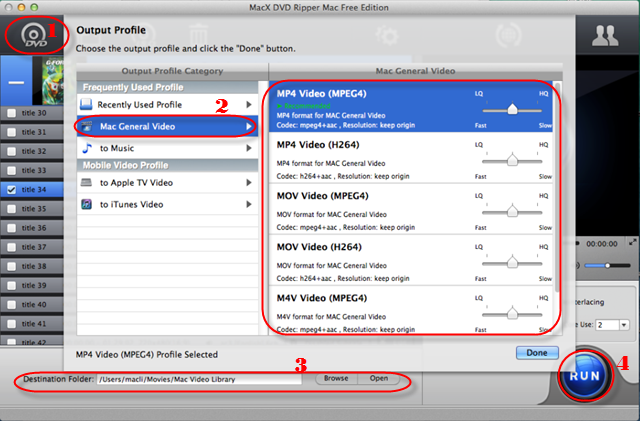
 
Step 1. Add files
Download and run MacX DVD Ripper Mac Free Edition, click "DVD Disc" or "DVD Path" button to import the DVD files.

Step 2. Choose the Output Formats
Select the output format as you wish, like DVD to MP4, DVD to FLV, DVD to MOV, DVD to iTunes, etc.

Step 3. Choose Output Folder
Click "Browse" button in output setting area and select a destination folder to save your converted video.

Step 4. Start Ripping
Click "RUN" to start the conversion. You can view the conversion progress or cancel the converting process at anytime. 


After this four simple steps, you can get your wanted MP4 format video within minutes by this functional free Mac DVD ripper. At the same time, the advanced functions will assist you to make stylish videos by clipping video segment, removing subtitles, changing video size, etc.

Wednesday, June 25, 2014

Useful Free DVD Ripper for iOS 8


It is known that iOS 8 is the eighth major mobile operating system which was announced at the WWDC on June 2, 2014 designed by Apple Inc. as the successor to iOS 7.

The main new features from iOS 8:
1. Messages: users can record audio and video messages, share their locations or add/remove someone in group conversations, etc.

2. Design: there are a few minor changes made comparing with iOS 7 such as added transparency and faster animation effects.

3. Photos and Camera: more useful options of editing picture have been designed in photos app including setting the desired brightness and colors of your photos. The camera app features of a shot timer which can be set to 3 or 10 seconds.

4. Keyboards: iOS 8 will allow users to install third-party keyboards.

Warm tips: the compatible devices of iOS 8 including:

1. iPhone 4S, 5, 5S, 5C.
2. iPad 2, Retina display, Air, mini, mini Retina.
3. iPod touch 5th gen.
4. Older models aren't supported.

According to the news, although iOS 8 has only been released in Beta form which is specially designed for the Apple developers, it is true that none of developers are able to install iOS 8 on their devices. So, even if you badly want to try this new operating system on your Apple devices, you’d better wait for the official release to users in fall 2014.

Useful tips: there is a free Mac DVD Ripper - MacX DVD Ripper Mac Free Edition introducing to you for ripping DVD movies to iOS 8 device and freely enjoying movies on it. This is a free DVD ripper for Mac users to backup and rip DVD movies (including commercial DVDs) to MOV, MP4, M4V, iTunes, Apple TV video for free, minus all copy protections that widely used in DVD movies, such as CSS encryption, Sony ARccOS, region protection, UOPs, APS, Disney movies copy protection.


Monday, June 23, 2014

Simplest Way to Choose Mac DVD Ripper


Among thousands of Mac free software, you must want to choose a useful and free DVD ripper for converting your movies in your video collection. Of course, this one must be the best one no matter in quality or utility. Honestly, what kind of factors must be taken into consideration before choosing?

Now, I will share some of my experience of how to pick up a good and free Mac DVD ripper for Mac. Firstly, the most important thing is the input and output video formats supported by the ripper: the more, the better. Secondly, the decryption function of DVD ripper which is capable of decrypting all kinds of copy protections from DVDs. Thirdly, the ripping speed is very important as well as the output video quality. It is true that you don’t want to spend a whole day waiting for the converting process. Lastly, the friendly user interface, a program must be very welcomed if it is very simple and convenient for the newbie.

MacX DVD Ripper Mac Free Edition should be the ideal free DVD converter software for Mac users, which can convert DVD to MOV, MP4, MPEG, FLV, iTunes, etc after broken the latest encrypted technologies like CSS encryption, Sony ARccOS, region protection, UOPs, APS, Disney movies copy protection. At the same time, you also can rip DVD to portable devices, like iPhone, iPod, iPad, Samsung, HTC, Sony and more.

Some people may wonder how to use this ripper. Don’t worry, it is very simple so that you can finish all of the procedure by four steps, such as, add files, choose the output formats, select the destination folder and start ripping. You can have a try about this free Mac DVD ripper.