Showing posts with label free video converter for Mac. Show all posts

Friday, July 11, 2014

Best Free Video Converter for Mac with No Watermark and Limitation


"I have been searching the free Mac video converter. I've tried a few but they all have a watermark, or when you download it, it’s a trial and asks you to buy a full version. Is there any free video converter with full version, no trial, no watermark?" 
                                                            - From Yahoo Answer

There are so many similar puzzles on internet. People who put forward this question are urgent to find one so that they can freely converter their videos on Mac. For sure, they have tried all kinds of trails which can’t meet their needs but ask for exceptional charges. Sometimes, maybe there are different adware or spyware built in them. While, the others will leave a watermark in the middle of the video you converted. And only after Mac users download and install these “free video converters”, they may cry out that this is not the right one.

It is true that watermark refers to a recognizable audio, pictures or video, which is embedded information into a digital signal used to verify its authenticity or the identity of its owners of the media. If the signal is copied, then the information also is carried in the copy for providing copyright protection for the media. It will bring bad experience for viewer and this is also why some people emphasizing “no watermark” when seeking for free video converter for Mac.  

Mac Free Video Converter without Watermark
MacX Video Converter Free Edition devotes to freely convert video on Mac without any watermark. It is capable of converting all popular video formats from HD to HD, HD to SD and SD to SD. For example, convert wmv to mov, video to mobile phone.The supported video formats cover HD formats like MKV, AVCHD, M2TS etc and SD video formats AVI, MPEG, MP4, DivX, XviD, MOV, FLV, RM, WebM etc. Furthermore, this full version of free video converter for Mac is life-long free for uses to convert any video clip to Mac, iPhone ,iPad, iPod, Android, etc.


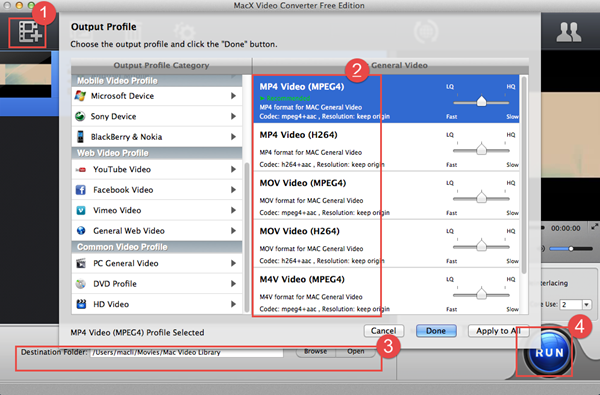
About the method of application, you only need four simple clicks in order to finish the conversion including load video files, choose the output format, select the output folder and start converting.

Here you can freely download and have a try.

Tuesday, July 8, 2014

Freely Convert YouTube Video to MP4 Format on Mac


When referring to YouTube, everyone is so familiar with this online watching video website which is full of plentiful funny and amazing videos and can bring much happiness and joy for us. Certainly, YouTube video can be viewed at any places on computers and portable devices if these devices could be connected to internet. But if there is no internet connection or network is so congested, how do we freely enjoy YouTube videos? Simply, the first way to be figured out is downloading videos from YouTube and converting YouTube video to MP4 or other formats which are compatible with some other mobile devices.

MP4 is one of the most widely used video formats, which is compatible with almost all the portable players. The wisest choice for you is MP4 if you have an opportunity to select the targeted format in order to make it playable on the other players. And the next problem is how to transfer YouTube video to MP4 on Mac.


Functional Free Mac MP4 Video Converter

With this question, we begin to seek for a useful Mac video converter and of course, free one is better. MacX Video Converter Free Edition, same as the name shows, is a totally free yet all-in-one video converter for Mac which provides the easiest solution to freely convert among a large number of HD formats and SD formats like MKV, M2TS, AVI, MP4, FLV, etc. At the same time, it works as a free MP4 video converter for Mac which supports freely converting YouTube video to MP4 for playback on QuickTime player and iPhone, iPad, iPod.


Simple Four Steps to Finish the Conversion

Step 1 Load YouTube video
Download MacX Video Converter Free Edition, install and run it. Click the "Add Files" button to input your YouTube files. In addition, batch YouTube to MP4 conversion is also supported so that you can add several YouTube videos at the same time.


Step 2 Choose "to MP4" as the output format
Choose MP4 as output format from the format list. You are allowed to change audio and video parameters as you wish.

Step 3 Select the output folder
Click the "Browse" button and choose the location where you would like to save your converted MP4 files.

Step 4 Start converting YouTube to MP4 video
Hit on "RUN" button to start the YouTube video to MP4 conversion.


Surprisingly, after several minutes you can get MP4 format video. However, if you also have any hesitation, you are allowed to have a try by freely downloading and installing this free Mac video converter without any plug-ins, spyware and adware.